 CSSPocket
Inspect any website.
Copy clean CSS in one click.
Hover any element to see its fonts, colors, spacing and assets. Copy it as CSS, Tailwind or a ready prompt for your AI builder.
No account. Runs only when you click it.
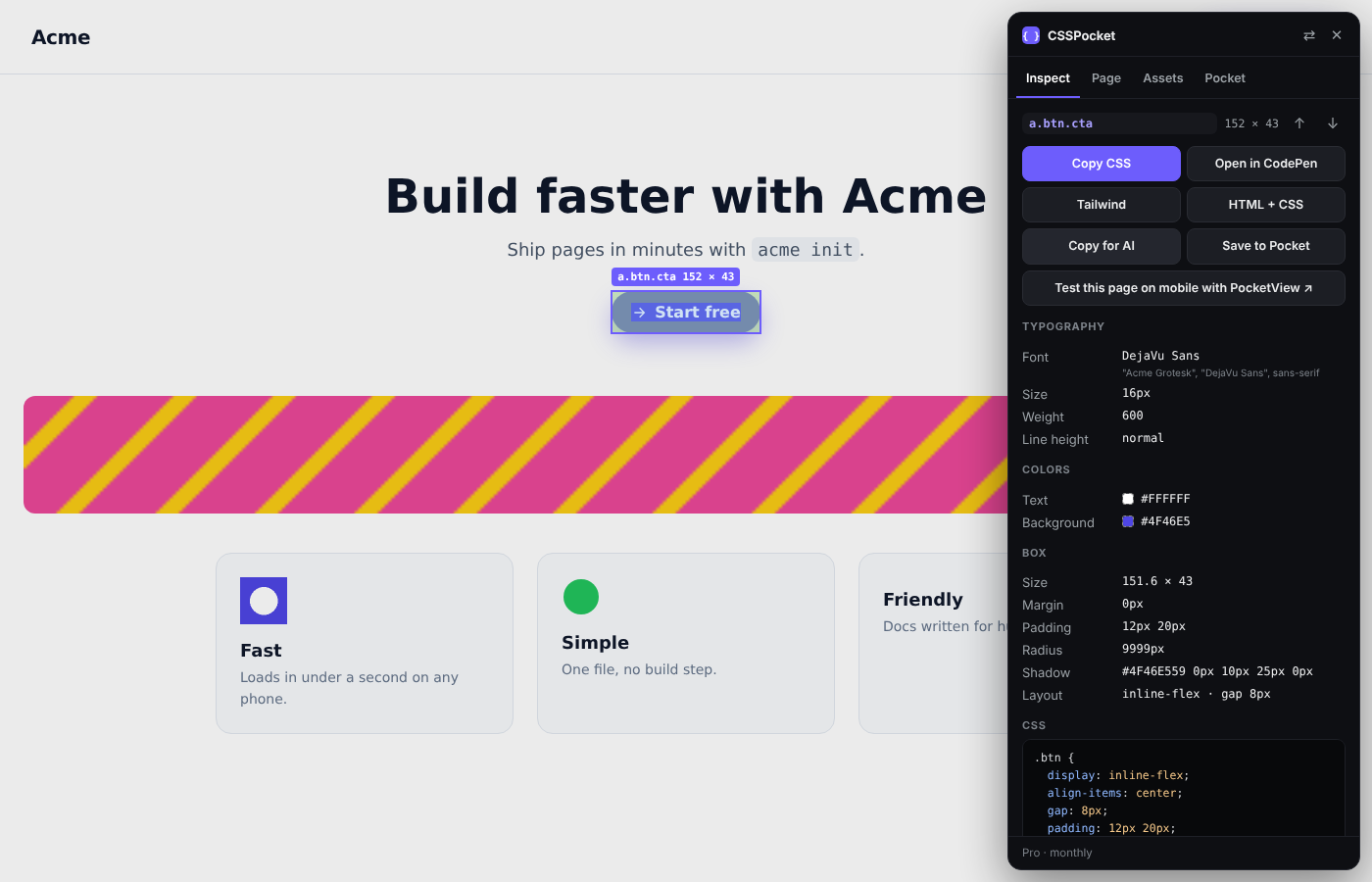
Everything you check in DevTools, in one panel
Built for designers, front end developers and anyone building with AI.
Clean CSS, not noise
Copy only the styles that matter. Browser defaults are stripped and shorthands are collapsed, so you paste 8 lines, not 80.
Find any font
See the font that actually renders, not just the font stack. Size, weight and line height in one glance.
Colors and palette
Every color on the element and the whole page palette. Pick any pixel with the color picker. Export the palette as PNG.
Tailwind in one click
Turn any component into Tailwind classes with arbitrary values where the scale does not fit.
Copy for AI
A ready prompt for Lovable, Cursor, Bolt or Claude with the HTML, styles, fonts and colors of the component.
DESIGN.md
Scan a whole page into a design system file: colors, type scale, spacing, radius and shadows.
All assets as ZIP
Images, SVG icons and background images, cleaned and zipped. Or grab one at a time for free.
Your Pocket
Save components you like while you browse and come back to them later. Export and import any time.
Keyboard first
Alt + Shift + C to open. Arrow keys move to parent and child. Click to lock. Esc to close.
Free vs Pro
The free version is a full inspector. Pro adds the exports that save the most time.
| Free | Pro | |
|---|---|---|
| Inspect elements, box model, fonts, colors | ✓ | ✓ |
| Copy clean CSS | ✓ | ✓ |
| Page palette and fonts | ✓ | ✓ |
| Color picker | ✓ | ✓ |
| Download single assets | ✓ | ✓ |
| Open in CodePen | ✓ | ✓ |
| Copy as Tailwind | - | ✓ |
| Copy HTML + CSS | - | ✓ |
| Copy for AI | - | ✓ |
| All assets as ZIP | - | ✓ |
| - | ✓ | |
| DESIGN.md | - | Yearly and Lifetime |
Simple pricing
Start free. Upgrade when it saves you time.
- Inspect any element
- Copy clean CSS
- Fonts, colors and box model
- Page palette and fonts
- Download single assets
- Color picker and Open in CodePen
- Everything in Free
- Copy as Tailwind or HTML + CSS
- Copy for AI (Lovable, Cursor, Claude)
- Download all assets as ZIP
- Pocket: save up to 50 styles
- 1 browser
- Everything in Monthly
- Unlimited Pocket
- DESIGN.md for whole pages
- Early access to new features
- 3 browsers
- Everything in Yearly
- Pay once, keep it forever
- All future updates
- 3 browsers
- Launch price for the first 100
Prices in USD. No trial that charges you later. 14 day refund, no questions. Free features never move to Pro.
Questions
Do I need an account?
No. The free version works right after you install it. If you buy Pro, it turns on in your browser right after checkout. To use it on another computer, enter the email you paid with and we send you a 6 digit code. No password.
What can CSSPocket see?
Nothing until you click the toolbar icon or press Alt + Shift + C. It then runs only on that tab. We do not track the pages you visit, and your Pocket stays in your browser.
Does it work on any website?
It works on almost every site. Chrome does not let any extension run on chrome:// pages or the Chrome Web Store, so CSSPocket cannot run there.
What is the difference between Monthly and Yearly?
Monthly gives you all the copy and export tools with a Pocket of 50 styles on 1 browser. Yearly adds unlimited Pocket, DESIGN.md and 3 browsers, and costs less than 7 months of Monthly.
Can I cancel any time?
Yes. Cancel from Manage billing and you keep Pro until the end of the period you paid for. If you are not happy in the first 14 days, email us for a full refund.
Will free features become paid later?
No. What is free today stays free.
Stop digging through DevTools
Install CSSPocket and press Alt + Shift + C on any page.
Add to Chrome, it's free